One of my devices came with the frustrating “Killer Networking” package from Intel. The only thing it kills is performance, causing noticeable delays in accessing SharePoint Online sites or other properties where round-trip time between your device and the target host is important.… [ Continue reading ]
Troubleshooting Entra Connect permissions sync errors
Over the years, I’ve written a couple of different blog posts and tools designed to help identify AD objects with broken inheritance–primarily because they intersect with mailbox migrations or AAD Connect–err, Entra Connect Sync–problems,
Today, we’ll dig into some automation I put together to help identify why Entra Connect is failing to write-back to on-premises AD objects.… [ Continue reading ]
Viewing nested groups in Exchange Online
Sometimes, you need to see the group within the group. And, a lot of times, it’s nice to see it laid out in a handy tree-type view.
Not a whole lot to say about this, except that it provides a new way to look at Exchange Online groups from a nested perspective.… [ Continue reading ]
Delete events in resource calendars
Recently, as part of a tenant-to-tenant migration, I ran into a problem where a customer had included all of their resource calendars (conference rooms, reservable equipment) in calendar migrations.
Unfortunately, once you’re no longer in the source tenant, you don’t have a way to cancel the meetings.… [ Continue reading ]
PowerShell Mouse Jiggler
If you have a need to deploy a mouse jiggler (to keep your PC from falling asleep) but don’t have rights to install things on your PC, this is the solution for you!
This script can be run interactively (dot source the function and then run it) or by adding it to your PowerShell profile.… [ Continue reading ]
Finding Scopes for Microsoft Graph commands
Before we go too far, I just want my disdain for the Microsoft Graph cmdlets to be known.
With that out of the way, finding the required permission scopes for and command can be frustrating. And, to make matters more difficult, the Find-MgGraphCommand cmdlet returns all valid scopes, not limited or broken into a least privilege model (read vs write).… [ Continue reading ]
Troubleshooting AADSTS50105: Your administrator has configured the application Microsoft Graph Command Line Tools (’14d82eec-204b-4c2f-b7e8-296a70dab67e’) to block users unless they are specifically granted (‘assigned’) access to the application.
While working on a recent tenant-to-tenant migration, I wanted to start updating my tooling to work with the new MgGraph cmdlets. Am I the only one that thinks “MgGraph” sounds like a value meal?
Anyway.
During the connection process, I ran into this error:
… [ Continue reading ]AADSTS50105: Your administrator has configured the application Microsoft Graph Command Line Tools (’14d82eec-204b-4c2f-b7e8-296a70dab67e’) to block users unless they are specifically granted (‘assigned’) access to the application.Â
Quick report for all Directory Role members
One of the things that’s difficult about documenting an environment is figuring out who has what role memberships. What makes finding this information frustrating from an automation and formatting perspective is that it’s difficult to get the necessary properties of various commands to come together easily.… [ Continue reading ]
Getting sub-organization per-license counts in a shared tenant environment
If you’ve ever been involved in tenant-to-tenant migrations, getting an accounting for which users are consuming which licenses is part of the job. When you’re working with large shared infrastructures with lots of different SKUs and license assignments, it goes from being a chore to a full-on headache sometimes.… [ Continue reading ]
How Active Directory Account Expiration works
I’ve had a few customers ask for information on how to detect account expirations in Active Directory. There are a number of ways to do it, but one of the more interesting ways is to compute the expiration based on the accountExpires attribute.… [ Continue reading ]
Working around accounts that expire with AAD Connect: REDUX
When attempting to migrate a Microsoft 365 organization from federated authentication to Password Hash Sync, there are a couple of gotchas that can impact how you manage certain accounts. These changes in authentication behavior determine whether you need to implement new workflows or business processes–changes surrounding expired accounts and accounts flagged to force password change on next logon.… [ Continue reading ]
Find a value in any property in AD
A few days ago, I was trying to find all instances of a value stored in AD. I was trying to understand all of the places that a particular partial GUID value was being used. so I had to come up with a way to search all properties for all objects across the directory space.… [ Continue reading ]
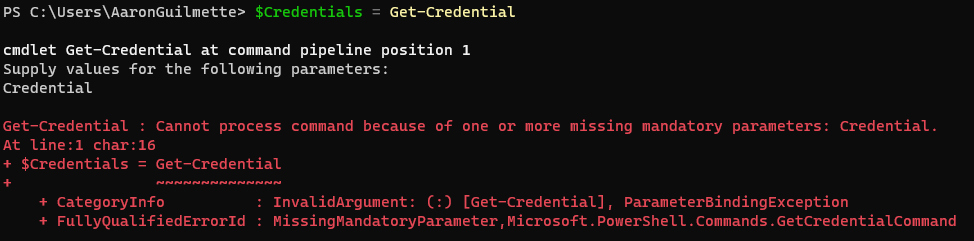
“Get-Credential” fails with “Cannot process command because of one or more missing mandatory parameters: Credential.”
This morning, I was working with a new build of Windows 11 (22H2) and came across this frustrating error:

After running the Get-Credential cmdlet, the console is immediately returned to me with an error that I didn’t specify the -Credential parameter.… [ Continue reading ]
Locating accounts in Active Directory that are expired but still active
While working with a customer over the past few weeks implementing a new AAD Connect synchronization rule to disable expired accounts, we wanted to evaluate how many accounts might be selected by such a rule.
Checking hundreds, thousands, or even tens of thousands of accounts by hand doesn’t rank high on anyone’s list–fortunately, that’s what PowerShell was made for.… [ Continue reading ]
Working around accounts that expire with AAD Connect
When attempting to migrate a Microsoft 365 organization from federated authentication to Password Hash Sync, there are a couple of gotchas that can impact how you manage certain accounts. These changes in authentication behavior determine whether you need to implement new workflows or business processes–changes surrounding expired accounts and accounts flagged to force password change on next logon.… [ Continue reading ]