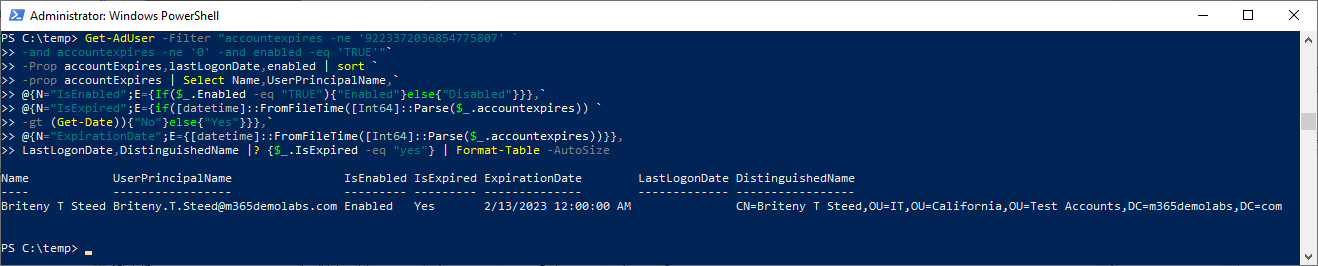
While working with a customer over the past few weeks implementing a new AAD Connect synchronization rule to disable expired accounts, we wanted to evaluate how many accounts might be selected by such a rule.
Checking hundreds, thousands, or even tens of thousands of accounts by hand doesn’t rank high on anyone’s list–fortunately, that’s what PowerShell was made for.
With this one-liner (it wraps, but it still counts), you can identify accounts in your organization that have been set to expire (the account expiration date is something other than 9223372036854775807 or 0) and are still active, and then evaluate if that expiration date is in the past or in the future.
Get-AdUser -Filter "accountexpires -ne '9223372036854775807' `
-and accountexpires -ne '0' -and enabled -eq 'TRUE'"`
-Prop accountExpires,lastLogonDate,enabled | sort `
-prop accountExpires | Select Name,UserPrincipalName,`
@{N="IsEnabled";E={If($_.Enabled -eq "TRUE"){"Enabled"}else{"Disabled"}}},`
@{N="IsExpired";E={if([datetime]::FromFileTime([Int64]::Parse($_.accountexpires)) `
-gt (Get-Date)){"No"}else{"Yes"}}},`
@{N="ExpirationDate";E={[datetime]::FromFileTime([Int64]::Parse($_.accountexpires))}},
LastLogonDate,DistinguishedName |? {$_.IsExpired -eq "yes"} | Format-Table -AutoSize
The output should look something like this: