

Yesterday, while trying update my comptuer with newer Microsoft Graph modules to build some documentation, I ran into a frustrating issue–my internet connection was having problems, and the Microsoft Graph module kept failing to install because its dependencies kept failing to install.
Here’s how I fixed it.
Background
The Microsoft.Graph module is what’s known as a metamodule or a manifest module–that is, to say, it’s essentially just a container with a manifest that contains a list of all of its supporting modules.
So, when you go to install it, it queries the manifest list and finds all of the modules that it needs and downloads them all individually. If you’re having internet connection problems, that can (warning: pun incoming) manifest itself in a very frustrating way:
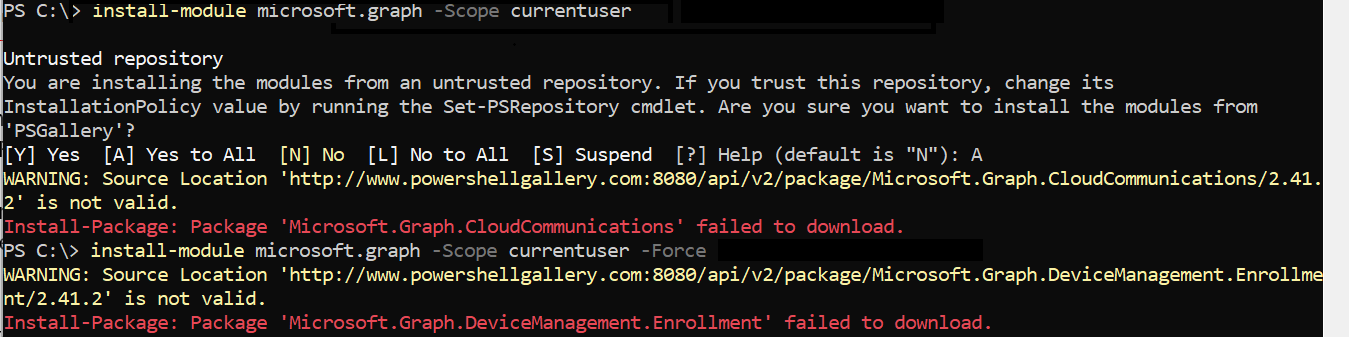
Ugh.
Of course, this requires constant nannying to make sure that all of the module dependencies get installed. If one fails, do not pass go, do not Connect-MgGraph. Start at the beginning. And that’s a long, frustrating thing to do–especially if you have places to be.
The Solution
In this case, the solution I came up with was enumerating all of the dependencies and then installing them independently, and then validating that it was all done.
<#
.SYNOPSIS
    Installs Microsoft.Graph and all of its sub-modules, retrying any that fail to download.
.PARAMETER
    Version Graph SDK version to install. Defaults to the latest on PSGallery.
.PARAMETER
    MaxPasses How many full retry passes to make over failed modules.
.PARAMETER
    Scope CurrentUser (default) or AllUsers (requires elevation).
#>
[CmdletBinding()]
param(
    [string]$Version,
    [int]$MaxPasses = 10,
    [int]$DelaySeconds = 5,
    [ValidateSet('CurrentUser','AllUsers')]
    [string]$Scope = 'CurrentUser'
)

$ErrorActionPreference = 'Stop'
[Net.ServicePointManager]::SecurityProtocol = [Net.SecurityProtocolType]::Tls12

# Configure the PSGallery Repo and set it to Trusted to suppress errors/prompts
$repo = Get-PSRepository -Name PSGallery -ErrorAction SilentlyContinue
if (-not $repo -or $repo.SourceLocation -notmatch '^https://www\.powershellgallery\.com/api/v2/?$') {
    Write-Warning "PSGallery source looks wrong: '$($repo.SourceLocation)'. Re-registering default."
    if ($repo) { Unregister-PSRepository -Name PSGallery }
    Register-PSRepository -Default
}
Set-PSRepository -Name PSGallery -InstallationPolicy Trusted

# --- Resolve the dependency list from the Microsoft.Graph meta-module ---
$findArgs = @{ Name = 'Microsoft.Graph'; Repository = 'PSGallery' }
if ($Version) { $findArgs.RequiredVersion = $Version }
$meta = Find-Module @findArgs
$Version = $meta.Version.ToString()
Write-Host "Target Microsoft.Graph version: $Version" -ForegroundColor Cyan

# Microsoft.Graph.Authentication is the initial dependency
$modules = @('Microsoft.Graph.Authentication') +
           ($meta.Dependencies | ForEach-Object { $_.Name } |
            Where-Object { $_ -ne 'Microsoft.Graph.Authentication' } | Sort-Object -Unique)

function Test-Installed([string]$Name, [string]$Ver) {
    [bool](Get-Module -ListAvailable -Name $Name | Where-Object { $_.Version -eq [version]$Ver })
}

# Prefer PSResourceGet since it can skip dependency resolution entirely.
$usePSResource = [bool](Get-Command Install-PSResource -ErrorAction SilentlyContinue)
Write-Host ("Installer: " + ($(if ($usePSResource) {'Install-PSResource (-SkipDependencyCheck)'} else {'Install-Module (no -Force)'}))) -ForegroundColor Cyan

function Install-One([string]$Name, [string]$Ver, [switch]$IsAuth) {
    if ($usePSResource) {
        $p = @{ Name = $Name; Version = $Ver; Repository = 'PSGallery'; Scope = $Scope
                TrustRepository = $true; Reinstall = $false; ErrorAction = 'Stop' }
        if (-not $IsAuth) { $p.SkipDependencyCheck = $true }
        Install-PSResource @p
    }
    else {
        # No -Force: PowerShellGet v2 then treats an already-installed
        # Microsoft.Graph.Authentication at $Ver as satisfied and skips it.
        Install-Module -Name $Name -RequiredVersion $Ver -Repository PSGallery -Scope $Scope `
            -AllowClobber -SkipPublisherCheck -ErrorAction Stop -WarningAction SilentlyContinue
    }
}

# --- Install Authentication
$auth = 'Microsoft.Graph.Authentication'
if (-not (Test-Installed $auth $Version)) {
    for ($i = 1; $i -le $MaxPasses -and -not (Test-Installed $auth $Version); $i++) {
        try   { Write-Host "Installing $auth $Version (attempt $i)..."; Install-One $auth $Version -IsAuth }
        catch { Write-Host "  FAILED: $($_.Exception.Message)" -ForegroundColor Red; Start-Sleep ($DelaySeconds * $i) }
    }
    if (-not (Test-Installed $auth $Version)) { Write-Error "$auth could not be installed; aborting."; exit 1 }
}
Write-Host "$auth $Version present." -ForegroundColor Green
$modules = $modules | Where-Object { $_ -ne $auth }

$pending = [System.Collections.Generic.List[string]]::new()
$modules | Where-Object { -not (Test-Installed $_ $Version) } | ForEach-Object { $pending.Add($_) }
Write-Host "$($modules.Count) modules total, $($pending.Count) need installing." -ForegroundColor Cyan

for ($pass = 1; $pass -le $MaxPasses -and $pending.Count -gt 0; $pass++) {
    Write-Host "`n=== Pass $pass of $MaxPasses : $($pending.Count) remaining ===" -ForegroundColor Yellow
    $failed = [System.Collections.Generic.List[string]]::new()

    foreach ($m in $pending) {
        try {
            Write-Host "Installing $m $Version ..." -NoNewline
            Install-One $m $Version
            if (Test-Installed $m $Version) { Write-Host " OK" -ForegroundColor Green }
            else { throw "Install reported success but module not found." }
        }
        catch {
            Write-Host " FAILED: $($_.Exception.Message)" -ForegroundColor Red
            $failed.Add($m)
        }
    }

    $pending = $failed
    if ($pending.Count -gt 0 -and $pass -lt $MaxPasses) {
        $wait = $DelaySeconds * $pass   # simple linear backoff
        Write-Host "Waiting $wait s before retry..." -ForegroundColor DarkGray
        Start-Sleep -Seconds $wait
    }
}

if ($pending.Count -eq 0) {
    # All dependencies present; the meta-module now installs without re-downloading them
    Install-One 'Microsoft.Graph' $Version

    # Verify Authentication was not duplicated / replaced along the way
    $authCopies = Get-Module -ListAvailable -Name $auth | Where-Object { $_.Version -eq [version]$Version }
    Write-Host "$auth $Version copies on disk: $(@($authCopies).Count)" -ForegroundColor Cyan
    Write-Host "`nAll Microsoft.Graph modules ($Version) installed." -ForegroundColor Green
}
else {
    Write-Host "`nStill failing after $MaxPasses passes:" -ForegroundColor Red
    $pending | ForEach-Object { Write-Host "  - $_" -ForegroundColor Red }
    exit 1
}
Why solve a problem simply when you can spend 6 times as long creating a script to solve it?